Data
Data is the hub where you manage all aspects of your information. Here, your data is categorized into two main types: entities and Enums. The "Data" section is the foundational element of our platform, designed for defining, managing, and manipulating all data structures and elements. This pivotal section is structured into several key subsections: Entity Editor, Data Elements, CSV Imports, and CSV Exports. Each offers distinct functionalities to streamline your data management tasks.
In the platform's left sidebar, under the "DataModel" category, you're presented with the option to navigate between enums and entities. This allows you to actively select and work with either an entity or an Enum based on your specific needs. Activating an entity or Enum is straightforward and intuitive, providing you with immediate access to either data type for editing or review.
It is important to note that the choice between enums and entities is exclusively available in the "DataModel" category within the sidebar. In all other categories, the sidebar is designed to permit the selection of entities only. This is because, within these contexts, offering Enums would not be applicable or meaningful. The sidebar's design ensures that you are always presented with relevant options that align with the specific functionalities and requirements of each section of the platform.
Locking Behavior
In our platform, the "Data" section is safeguarded by a sophisticated locking mechanism, designed to ensure the integrity and security of your data while it is being accessed or modified. This feature is crucial for maintaining a streamlined workflow and preventing conflicts or unauthorized changes.
The locking mechanism operates on a simple yet effective principle: only one user can make changes within the "Data" section at any given time. This is achieved through a backend lock that activates as soon as a user enters this section. The lock serves as a protective barrier, granting exclusive access to the user and blocking concurrent modifications from others.
Once a user finishes their work and exits the "Data" section or logs out, the lock is automatically released. This ensures that the lock is held only while necessary and is promptly freed up for others to use. However, if a user navigates away from the "Data" section without properly exiting or closes their browser tab unexpectedly, the lock remains active. This persistence is a critical safeguard against potential data breaches or accidental changes, ensuring that the data remains protected until the user formally releases the lock.
In situations where another user encounters locked data, access can be regained in two ways: either by being the original user, who applied the lock or by having administrative rights that allow for unlocking. This dual approach ensures that data can always be accessed by those with the right permissions, while maintaining strict control over who can make changes.
For those without the permission to unlock or who are not the original user, a read-only mode is available. This mode ensures continued access to the data, allowing users to view but not alter the information, thus maintaining data security and integrity.
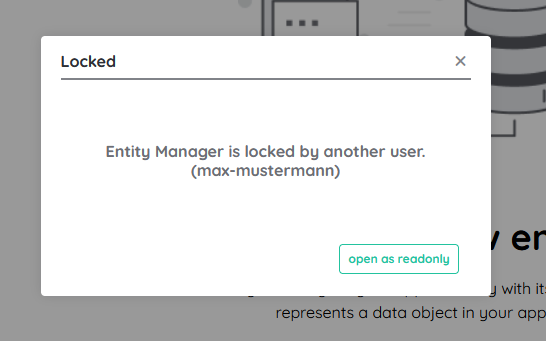
It is also worth noting that the CSV Import functionality incorporates an additional layer of access restrictions, further refining the control over data manipulation. This specialized lock mechanism is detailed in the CSV Import section, highlighting our platform's commitment to data security.
By implementing this locking behavior, our platform not only protects data from unauthorized access or accidental modifications but also ensures that users can work in an environment where data integrity is paramount. This methodical approach to data security underscores our dedication to providing a robust and reliable data management system.